
Amenity Interiors in the Client's AutoCAD Standard: 35 Sheets in Four Weeks
Interior documentation in AutoCAD for the amenity areas of a two-tower residential project in Vancouver, produced inside the interior design studio's own CAD standard, tag system and title block.
AutoCAD documentation only · Interior design by others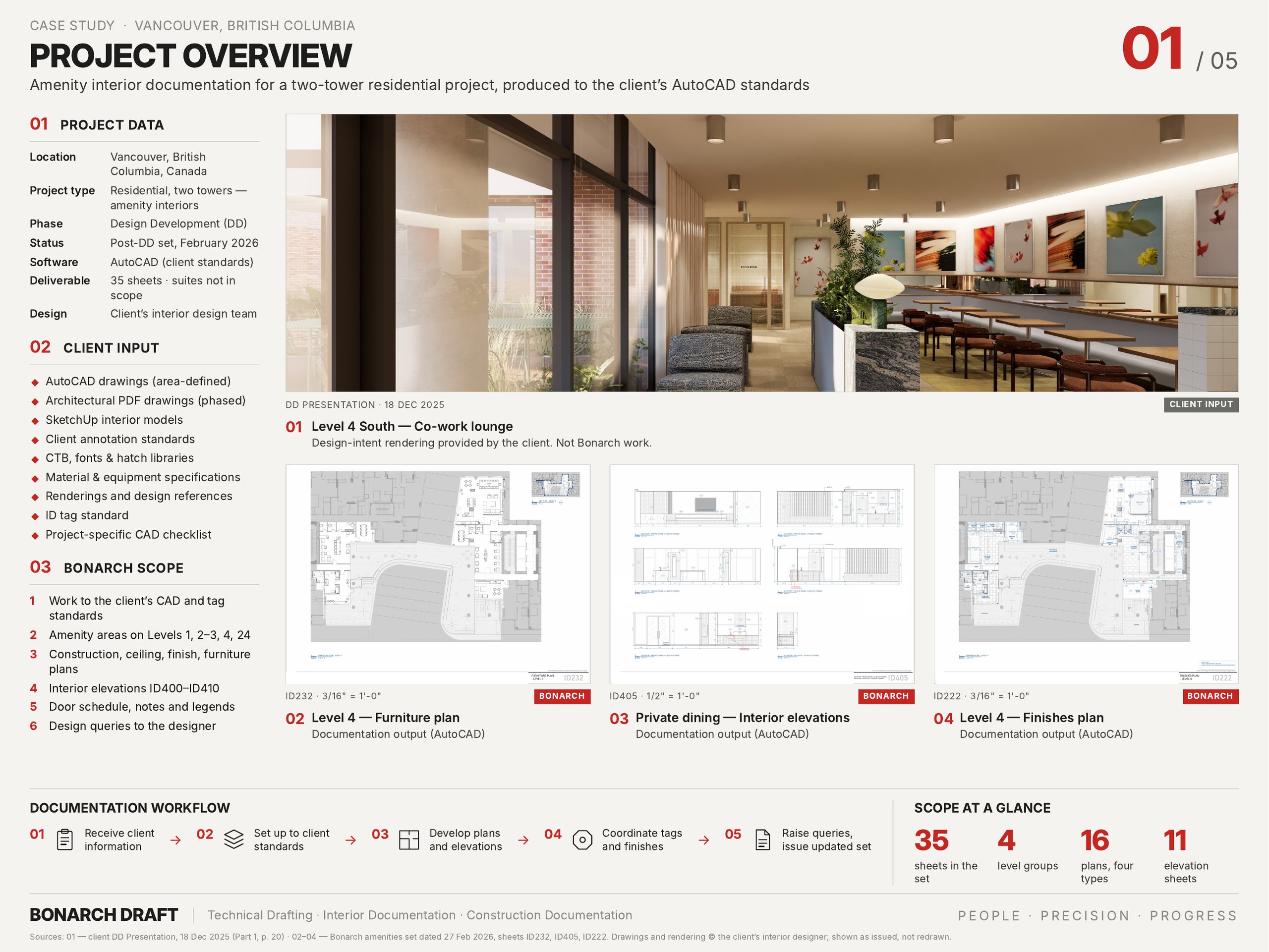
Project snapshot
- Location
- Vancouver, British Columbia, Canada
- Project type
- Residential development, North and South Towers: amenity interiors
- Client type
- Interior design studio
- Our role
- Interior documentation partner (design by the studio)
- Our scope
- Amenity areas on Levels 1, 2 & 3, 4 and 24; suites not included
- Stage
- Design Development (DD)
- Software
- AutoCAD, in the client's template, CTB, fonts and hatches
- Output
- 35-sheet PDF set, ARCH E1 (30 × 42 in)
- Team
- 3 people: project manager and two-person documentation team
- Duration
- About 4 weeks, delivered February 2026
The brief
An interior design studio had taken the amenity areas of a two-tower residential project to Design Development. It needed a documentation partner to turn its DD drawings, renderings and specification into a full amenities drawing set, working inside its own CAD standard, tag system and title block, none of which could be changed.
What we did
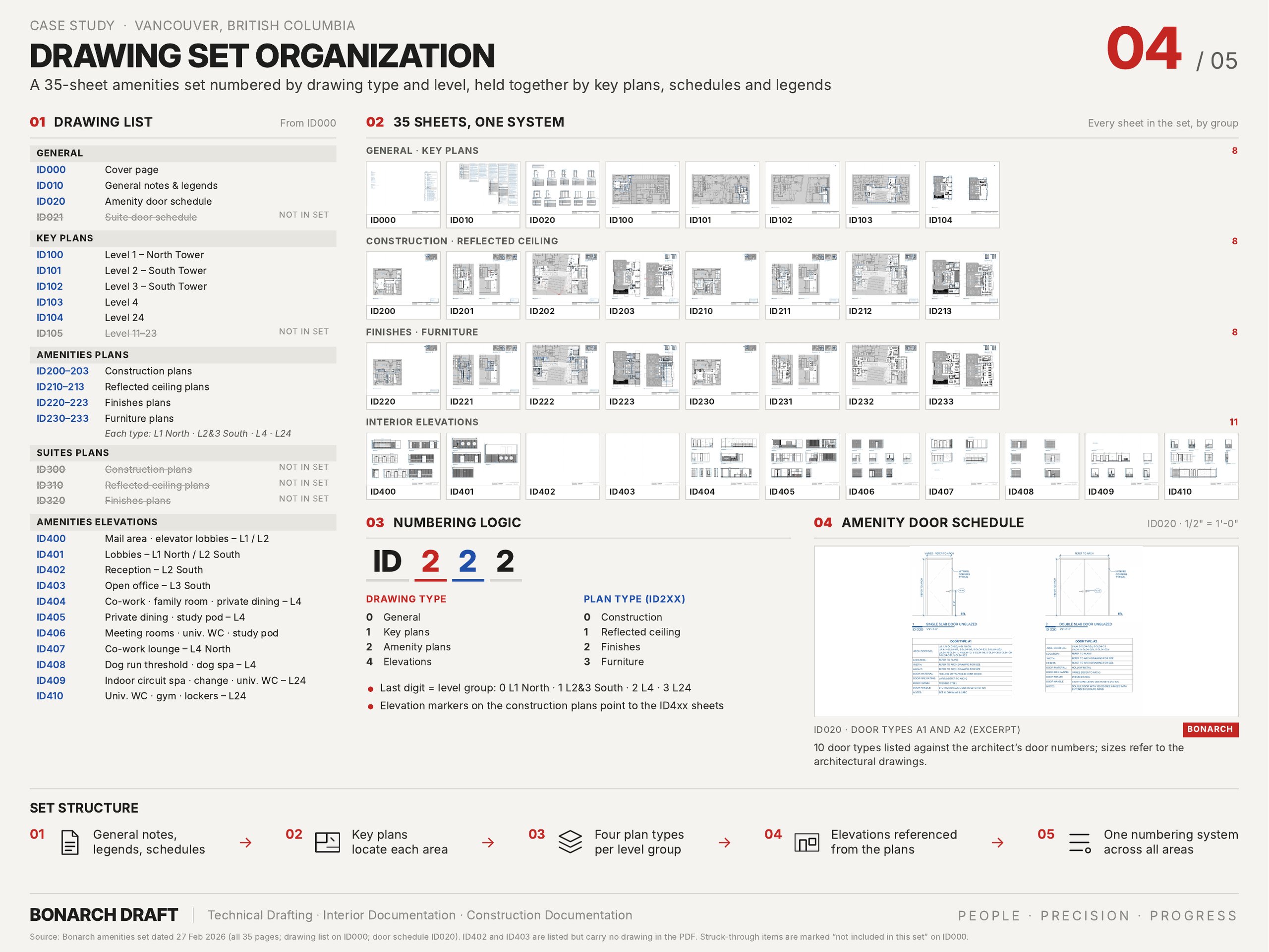
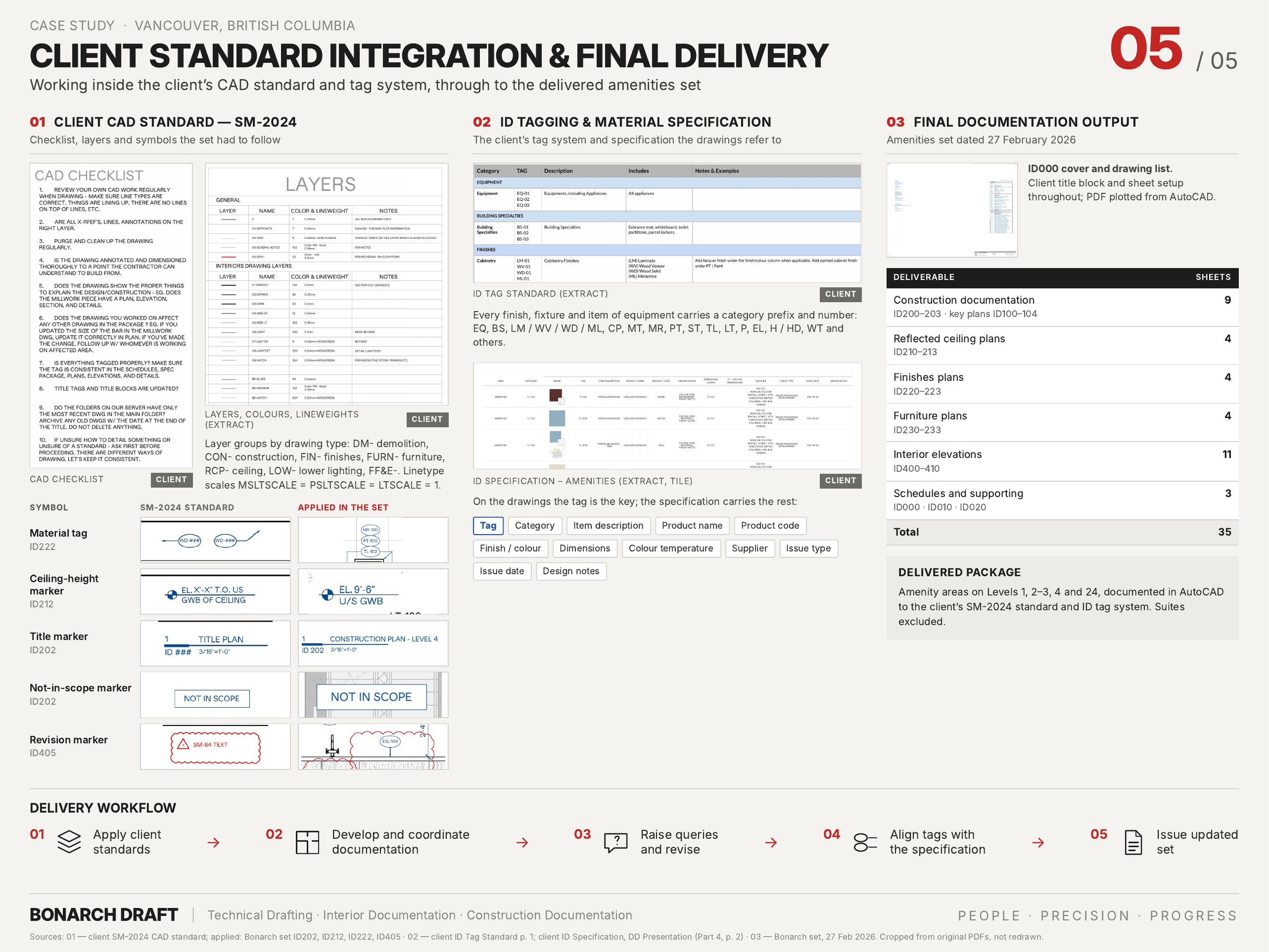
We documented the amenity areas on four level groups, from the lobbies, mail and parcel rooms to co-work lounges, private dining, a dog spa, Club 24, an indoor spa, sauna and gym, and delivered a 35-sheet set:
- Key plans (ID100–ID104): one per level, locating every documented area.
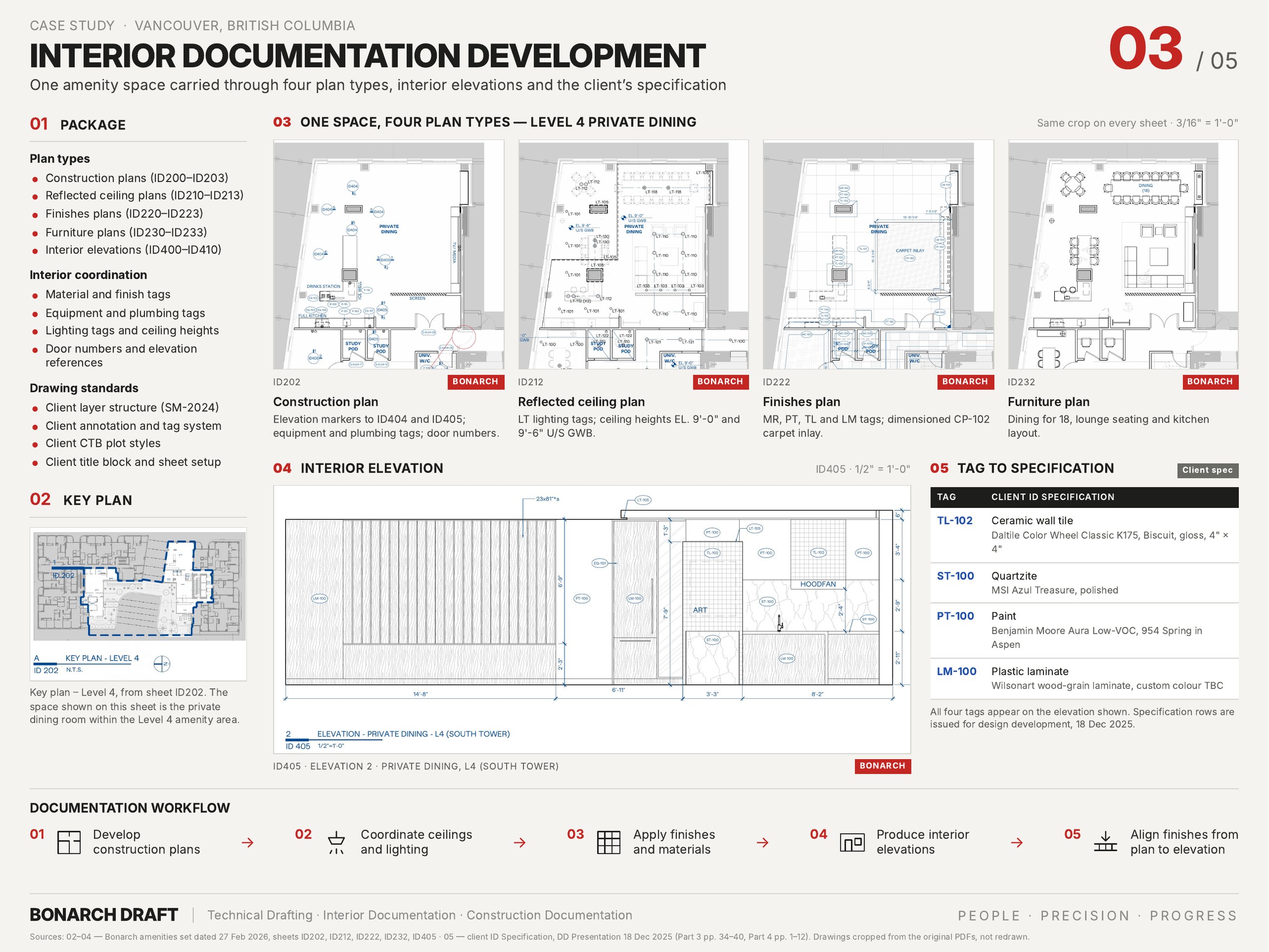
- Construction plans (ID200–ID203): room layouts, millwork, equipment and plumbing tags, door numbers and elevation references.
- Reflected ceiling plans (ID210–ID213): lighting tags and ceiling heights.
- Finishes plans (ID220–ID223): floor and wall finishes by tag, with dimensioned carpet inlays and tile setting-out.
- Furniture plans (ID230–ID233): furniture layouts for every space.
- Interior elevations (ID400–ID410): wall-by-wall finishes, millwork, equipment and lighting at 1/2" = 1'-0".
- Schedules and notes (ID000–ID020): drawing list, general notes and legends, and an amenity door schedule of 10 door types tied to the architect's door numbers.
Every tag on the drawings matches the studio's ID specification, which carries the product, code, finish, size and supplier.
Need drawings produced in your own CAD standard?
Get a price range in two minutes with our cost calculator, or send us your drawings for a fixed quote.
Sheets from the set
Tap any sheet to view it full size.
Challenges, how we ran the job, and the result, in detail.
Challenges and how we handled them
Their standard, not ours
The studio's CAD standard fixes layers, colours and lineweights, text and dimension styles, scales, symbols and title blocks, and its tag standard fixes every prefix. We worked inside its template, CTB, fonts and hatches, so every material tag, ceiling-height marker, title marker and revision cloud on the sheets is the studio's own and the set reads as theirs.
Your standard, your title block, our hours. That is how we work as an outsourced drafting partner for Canadian studios.
Many sources, one set
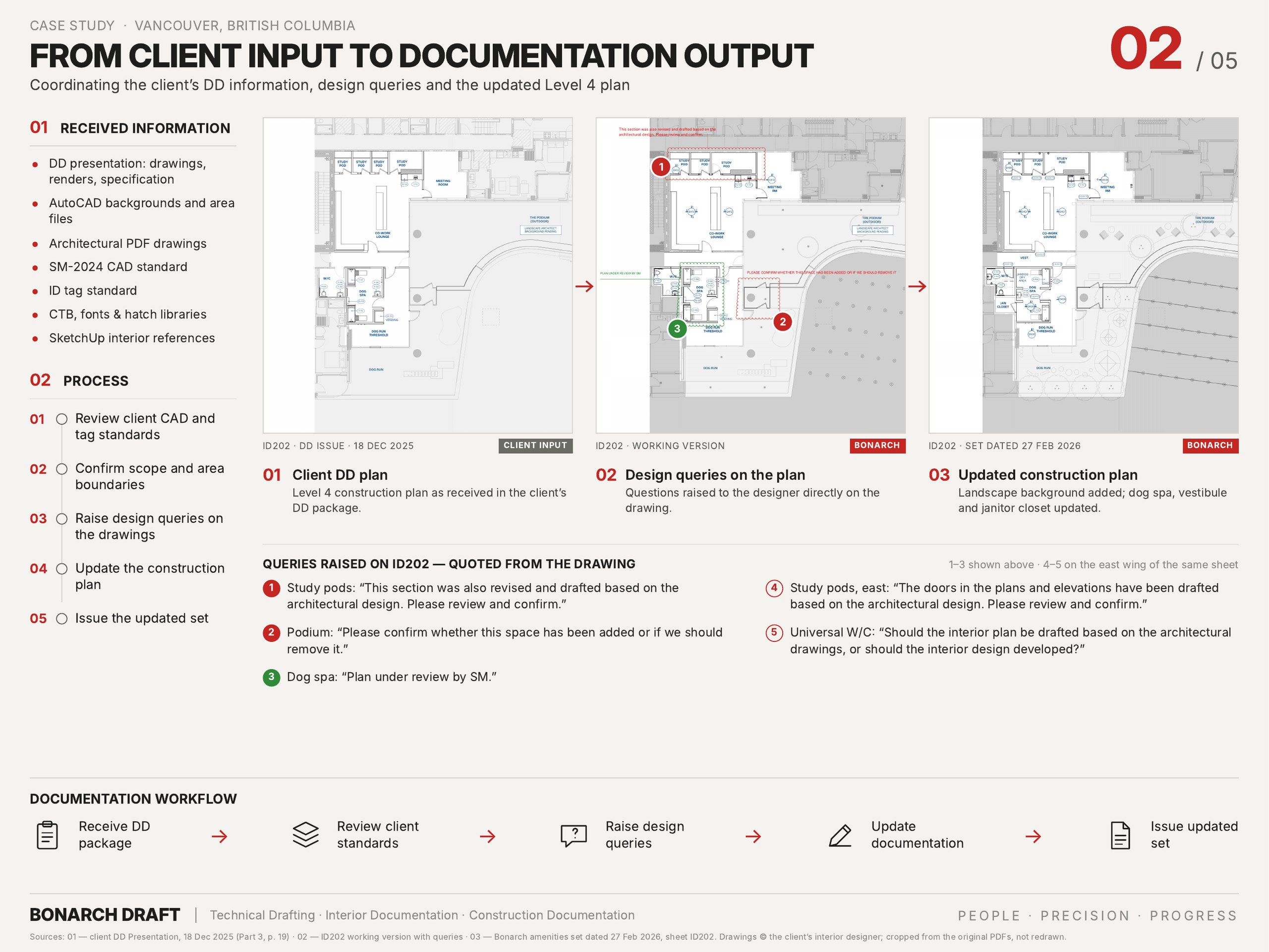
DD drawings, AutoCAD backgrounds, architectural PDFs, SketchUp models, renderings and the specification all described the same spaces. We read them together and carried one set of tags from the plans to the elevations and back to the specification.
Interior design vs. architecture
Where the interior layouts and the architectural drawings disagreed (study pods, doors, a universal W/C and a podium space), we drafted to the architecture and asked the designer to confirm directly on the drawing instead of guessing.
A design still moving
Landscape backgrounds, some equipment and furniture blocks, door numbers and parts of two elevation sheets were still open after DD. Each item was flagged on the sheet it affects, so the set shows exactly what is open.
Volume against time
Four level groups, four plan types each, eleven elevation sheets and a door schedule, in about four weeks with a team of three. The project manager tracked open items and queries throughout and checked the full set before issue.
Result
The studio received a 35-sheet amenities set in its own CAD standard in February 2026, about four weeks after we started, with every open design question clearly marked for its decision.
Related services
See how we support architects and interior designers across Canada on our Canada drafting and BIM services page, or send us a sheet for a free drawing review.
Scope: AutoCAD interior documentation only. Interior design by the studio; the rendering on sheet 01 is the studio's design-intent image, shown for context. Client, designer and architect names, addresses and title-block details have been removed from all images.